


You probably have an iPhone or Android, during using cool apps you might be wish if you can make an apps for your iPhone or Android, which is required a lot of knowledge of java, xml and iOS for developing and apps, Don't worry you don't need required to make an simple website or your personal custom apps for iPhone n Android apps.
In my tutorial i'm making it for techfoke, which is a techno blog. so i'm gonna use facebook, youtube, twitter, website link, you can use it personally by adding your favorite video, music, and other stuff.
Let's Make an Android/iPhone Apps Free...
Step 1 : Get register or login with your facebook on iBuildApp.com which allows you to make free apps for iPhone, Android, native iPad, and web apps.
Step 2 : On the Welcome back screen click on "Create Apps" and select "Native iPhone/Android app".
Step 3 : Now select a Template from 10 awesome templates according to your choice, i select "Custom App" to make unique mobile app for functional widgets for techfoke.
Step 4 : Enter your apps name and select platform, iOS for iPhone app, i select both and click on "Create".
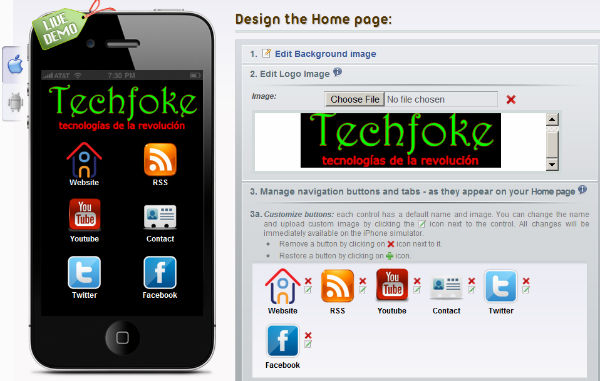
Step 5 : Its time to design Home Page,
1. Click on "Edit Background Image" default background color is black, you can change color or images use pre-designed images or use your own image. images must be 320x480 pixels and less then 1 M.B. size.
2. Edit image Logo, make your own logo with paintbrush, photoshop or any other tool, logo resolution must be Height="82" and width="258".
3. Our selected template is Custom apps so there are some icon you can change the icon, delete them on your choice and add your own icon if you are good enough in photoshop or a good GFX guy. icon resolution must be 70x70 and size under 1 M.B. ( if you are smart guy like me , useiconfinder.com get some icon of size 128 pixel and use them it will automatically scale it. )

Step 6 : You have to link your site with various button, in the left side in live demo box click on your "Website" home button and you can write about your website provide link and edit with html code after this all save it. Just like it again go to Home Page of your Apps and Click on your "RSS" button, now in the right side in page type click on "Change Page Type" and select "News", give page tittle name, i given techfoke, now scroll down and check box of "use your RSS feed" and put your blog or website RSS feed , i use http://techfoke.blogspot.com/rss.xml for your blog you can use http://yourblogname.blogspot.com/rss.xml ,then check both box of "Share news via Email" , "Share news via SMS" for better content and click on "Save".
*Just like this you can change all button with change page type, use twitter, facebook updates, insert music, Audio stream, Video stream, Google Map, Contacts details, Google Calender, Photo Gallery, Tap to call ( for iPhone), Ebook, Tap to Email, Events, Web, News, eCommerce, Coupons and add about your blog/website.
*After all this when you are sure your apps is ready, scroll down and click on "Continue"
Step 7 : Apps Setting, Now select mobile platform target i recommend you to select iOS and Android. next select time format by default there is 12 hours time format check box for 24 hours time format. now if you wish make an splash screen which will appear at time of lunching your apps, image resoultion must be 320x480 and file size under 1 M.B. now you can even earn $$$ by inserting your ads revenue from Google mobile ads, admob.com or can use your own add with html, i'm selecting No "Advertisement" and click on "save" and then click on "continue".
Step 8 : Now fill some information about your apps like name, categories, description, about your company blog url, apps logo but image can be in .png , .gif , .jpg , and 512x512 resolution and click on "continue".
Step 9 : Now don't confuse on in this step firstly we we publish it for android, now select android icon , it's totally free. click on Generate certificate (it will generate MD5 fingerprint which is unique identity of your apps ), now you'll see something like "EC:02:1A:F2:79:E6......" copy this md5 fingerprint, now you have to set up your Maps API key at code.google.com, just sign up here and paste your md5 fingerprint, check box of TOS and click on "generate api key", you'll see your api key just copy it. now back to our project and paste into the box "Enter your maps api key". Now enter the build version 1, 1.0, 1.1.2 or 2.0
In my tutorial i'm making it for techfoke, which is a techno blog. so i'm gonna use facebook, youtube, twitter, website link, you can use it personally by adding your favorite video, music, and other stuff.
Let's Make an Android/iPhone Apps Free...
Step 1 : Get register or login with your facebook on iBuildApp.com which allows you to make free apps for iPhone, Android, native iPad, and web apps.
Step 2 : On the Welcome back screen click on "Create Apps" and select "Native iPhone/Android app".
Step 3 : Now select a Template from 10 awesome templates according to your choice, i select "Custom App" to make unique mobile app for functional widgets for techfoke.
Step 4 : Enter your apps name and select platform, iOS for iPhone app, i select both and click on "Create".
Step 5 : Its time to design Home Page,
1. Click on "Edit Background Image" default background color is black, you can change color or images use pre-designed images or use your own image. images must be 320x480 pixels and less then 1 M.B. size.
2. Edit image Logo, make your own logo with paintbrush, photoshop or any other tool, logo resolution must be Height="82" and width="258".
3. Our selected template is Custom apps so there are some icon you can change the icon, delete them on your choice and add your own icon if you are good enough in photoshop or a good GFX guy. icon resolution must be 70x70 and size under 1 M.B. ( if you are smart guy like me , useiconfinder.com get some icon of size 128 pixel and use them it will automatically scale it. )
Step 6 : You have to link your site with various button, in the left side in live demo box click on your "Website" home button and you can write about your website provide link and edit with html code after this all save it. Just like it again go to Home Page of your Apps and Click on your "RSS" button, now in the right side in page type click on "Change Page Type" and select "News", give page tittle name, i given techfoke, now scroll down and check box of "use your RSS feed" and put your blog or website RSS feed , i use http://techfoke.blogspot.com/rss.xml for your blog you can use http://yourblogname.blogspot.com/rss.xml ,then check both box of "Share news via Email" , "Share news via SMS" for better content and click on "Save".
*Just like this you can change all button with change page type, use twitter, facebook updates, insert music, Audio stream, Video stream, Google Map, Contacts details, Google Calender, Photo Gallery, Tap to call ( for iPhone), Ebook, Tap to Email, Events, Web, News, eCommerce, Coupons and add about your blog/website.
*After all this when you are sure your apps is ready, scroll down and click on "Continue"
Step 7 : Apps Setting, Now select mobile platform target i recommend you to select iOS and Android. next select time format by default there is 12 hours time format check box for 24 hours time format. now if you wish make an splash screen which will appear at time of lunching your apps, image resoultion must be 320x480 and file size under 1 M.B. now you can even earn $$$ by inserting your ads revenue from Google mobile ads, admob.com or can use your own add with html, i'm selecting No "Advertisement" and click on "save" and then click on "continue".
Step 8 : Now fill some information about your apps like name, categories, description, about your company blog url, apps logo but image can be in .png , .gif , .jpg , and 512x512 resolution and click on "continue".
Step 9 : Now don't confuse on in this step firstly we we publish it for android, now select android icon , it's totally free. click on Generate certificate (it will generate MD5 fingerprint which is unique identity of your apps ), now you'll see something like "EC:02:1A:F2:79:E6......" copy this md5 fingerprint, now you have to set up your Maps API key at code.google.com, just sign up here and paste your md5 fingerprint, check box of TOS and click on "generate api key", you'll see your api key just copy it. now back to our project and paste into the box "Enter your maps api key". Now enter the build version 1, 1.0, 1.1.2 or 2.0


