Pages

Showing posts with label Facebook. Show all posts

Sunday, July 7, 2013

how to add facebook Invite Friends Link to your Blogger Site

1. Setp 1 How to Create Facebook App's

Finally, go to the Layout section of your Blogger dashboard and choose to add (or edit) an HTML/JavaScript gadget.
Paste the following code into your gadget, replacing the values highlighted in red and blue:
<script src="http://connect.facebook.net/en_US/all.js"></script>
<script>
FB.init({
appId:'your-app-id',
cookie:true,
status:true,
xfbml:true
});
function FacebookInviteFriends()
{
FB.ui({
method: 'apprequests',
message: 'Your Message Here'
});
}
</script>
<div id="fb-root"></div>
<span class="invite-friends-link"><a href='#' onclick="FacebookInviteFriends();">
Invite friends link text
</a></span>
<script type='text/javascript'>
if (top.location!= self.location)
{
top.location = self.location
}
</script>
And save the changes.

This will create a basic text link which your blog visitors can click to bring up a Facebook dialogue box in which their friends can be invited to visit your site.

Here's a demo of how the "Invite Facebook Friends" link works:
Invite friends to Blogger Buster

How to Create your Facebook App

Create a Bit.ly URL for your blog

The first thing you'll need to do is create a short bit.ly url for your blog. This will enable us to circumvent the requirement for a secure base URL (beginning with https which we can't natively use with Blogger).

Make a note of this short bit.ly URL as you will need it when creating your app on Facebook.

Create your Facebook App

Now you'll need to create a Facebook Application as you'll need an appID to use in your code. Visit the Apps page on Facebook Developers to do this.

Name your application and fill in the first set of details as follows: 
  • Display Name - The name of your site 
  • Namespace - yournamespace (this will feature in the URL for your app. eg: http://apps.facebook.com/bloggerbuster)
  • Contact email - your email address 
  • App Domains - The URL(s) of the blog(s) you will be using this app for (eg: http://yourblog.blogspot.com) 

Next, click on "Select how your app integrates with Facebook" and fill in details as follows:
  • Website with Facebook Login - Your blog's URL (eg: http://yourblog.blogspot.com) 
  • Canvas URL - Here you'll need to enter the bit.ly url you generated for your site, adding a question mark at the end. For example, http://bit.ly/blgrbstr? 
  • Secure Canvas URL - Enter your blog's bit.ly URL beginning with https (eg: https://bit.ly/blgrbstr?) 

If you like, you can add an icon and thumbnail for your application at the top of the page; these will appear when readers use your app. Then save your changes.
Once you've done this, be sure to make a note of your App ID which will be shown at the top of the page as you'll need to add this to the code to be pasted in your site.

Saturday, May 25, 2013

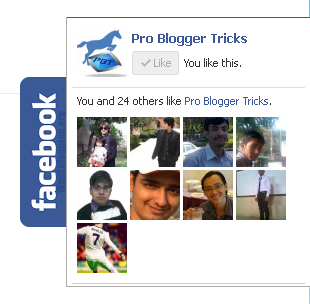
How to add Sliding Floating Facebook Like box in Blogger


Today article is all aboutFacebook pop up like box. Facebook pop up like box now a days used by many bloggers and webmaster to increase their Facebook fan page traffics in short period of time.Facebook pop up like box gain popularity day by day and it becomes a well known Facebook widget in 2013. inYou might have observed that now a days every one every webmaster and bloggers promote theirs blog website in different ways and styles. Many of them use this widget and it will surely increase your facebook fan page traffics.


This widget is widely used by many bloggers and webmasters to promote and increase the facebook fan page popularity. facebook pop up like box created in javascript, Css,Html and JQuery


-->

How To Add Floating facebook Like Box in blogger

Follow these Two simple steps given below

  • Got to blogger>>Layout:
  • Add a Gadget>>Html JavaScript Gadget:
  • Inside Html/JavaScript Gadget Past below code

-->

Step 1:

<script type="text/javascript">

//<!--
$(document).ready(function() {$(".w2bslikebox").hover(function() {$(this).stop().animate({right: "0"}, "medium");}, function() {$(this).stop().animate({right: "-250"}, "medium");}, 500);});
//-->
</script>
<style type="text/css">
.w2bslikebox{background: url("https://blogger.googleusercontent.com/img/b/R29vZ2xl/AVvXsEiyUWV-SPRcuQ8fuIeCpurJkHkDJzxTQ2_WT9WEfTAVl-86XetYYSNUx14syZ-YbtH4PXUtXfsKQ-z_1OX7e6smgWO0CpBIYtCpSDYaL8xjkK6yHAFJNsvVLgqCwl4N77qA_WZXGq-KSDQT/s150/w2b_facebookbadge.pn") no-repeat scroll left center transparent !important;display: block;float: right;height: 270px;padding: 0 5px 0 46px;width: 245px;z-index: 99999;position:fixed;right:-250px;top:20%;}
.w2bslikebox div{border:none;position:relative;display:block;}
.w2bslikebox span{bottom: 12px;font: 8px "lucida grande",tahoma,verdana,arial,sans-serif;position: absolute;right: 6px;text-align: right;z-index: 99999;}
.w2bslikebox span a{color: #808080;text-decoration:none;}
.w2bslikebox span a:hover{text-decoration:underline;}
</style><div class="w2bslikebox" style=""><div>
<iframe src="http://www.facebook.com/plugins/likebox.php?href=(Your Facebook Page link );width=245&amp;colorscheme=light&amp;show_faces=true&amp; connections=9&amp;stream=false&amp;header=false&amp;height=270" scrolling="no" frameborder="0" scrolling="no" style="border: medium none; overflow: hidden; height: 270px; width: 245px;background:#fff;"></iframe></div></div>

Step 2:
Now you have done step one comes here what the next:
  • After adding the above code in layout html JavaScript Gadget:
  • Now go to dashboard >>Edit html
  • Find </head> tag and just before it past the below code.
<script src='https://ajax.googleapis.com/ajax/libs/jquery/1.6.1/jquery.min.js' type='text/javascript'/>

Now you have done all most click on save template and visit your blog you will seefacebook pop up like box on right side of home page. 

Tuesday, May 21, 2013

How To Get 10000 Of Friends On Facebook!!!


Hello Friends
This Is Yogesh Showing You Something Worthy Today.
Number Of friends In Friend list Represents the Popularity Level Of Peoples On Facebook. In This Virtual World,Everyone Wants To get more friends on facebook..
So Guys Today I am Going To show You A Trick By Which You Can Able To Get 10000 Or More Friends On Facebook In minutes.. :D

http://techwarlock.blogspot.in/2012/06/how-to-get-1000000-of-friends-on.html

So Here's The Trick.. :)

STEP 1: Go To  http://rankbook.co/facefriendrequester.php  And Click On TRY NOW to download the One Day Trial Pack Of Facebook Auto Friend Adder Pro 3.1 .

STEP 2:Its A Small Software, After Download Install That..

NOTE: During Installation It needs Microsoft .Net Installer Framework 4..If You don't Have this Framework on your computer Then Download and Install This By Going Through This link


After that Click On "Start Download" To Download And Install Microsoft .Net Installer Framework 4.


STEP 3: Double Click To Open Facebook Friend Requester. You will Look Something Like This.

In Url Bar of Facebook Friend Requester Type "http://www.facebook.com/"
and then

Enter Your Facebook Username and Password And Login From That Software.

http://techwarlock.blogspot.in/2012/06/how-to-get-1000000-of-friends-on.html


STEP 4: After Login Go To Any of Your Friends Profile Or any Famous Facebook Fan Page Or Group Where You Want To Add All Members In Your Friend List.

STEP 5: After That Click On "Get user Id From Page" Which you Can See In The Left Hand Side Of the Page.It Will Take Sometime to Gather User ID of Everyone Present On The Page,Friend list Or In a Group.

http://techwarlock.blogspot.in/2012/06/how-to-get-1000000-of-friends-on.html


STEP 6: If You want To Select A Time limit To Send Requests Duration from One Person To Another Then Click On "Settings Tab" Under The Software And Modify Value From 50 To Anything. :)


STEP 7: After That Come Back To "Get Users ID" Tab And Then Click On "Send Friend Requests"
It Will Send Friend Requests To All The People's Profiles Who's USER ID is Fetched By You..


You Can Try This On Biggest Groups Or Pages Where Number Of Members Is More Than 100000

Or Even You Can Apply This On Your Friends Profile..And You Can Able to Send Them a Request In A Single Click... :))

When People Starts To Accept Your Requests..You Will See A Massive Increase In Your Facebook Friend list..So Try This SimpleTrick To get friends on facebook And Please Comment.. :)

EnjOyy..!!

how to hack facebook password ?


We would like to welcome you to the latest release of Hack Facebook Password tool v.2.6.0.
A recent patch meant that older versions would no longer work, but after some hard work, research and investigation how to hack facebook password we have finally managed to fix the patch. Our Hack Facebook Password tool is once again functional!

Many of you are probably wandering how come it’s possible to hack facebook password with just using this software? Well, to make you fully understand the system how this application works you would probably need around few months first to learn the basics of programming. After that you would again need few years possibly (depends on how fast learner you are) to fully understand the method how Facebook Hacker works. But briefly, Facebook Hacker is researching trough facebook database where accounts passwords are stored, and depends on your victim’s email and profile ID number/ username, it decrypts the passwords using the decryptor plugin built inside. Some passwords can be hacked in few seconds only, some can take few minutes, or rarely hours. This depends on how your victim’s facebook password is made. Passwords which are hard to hack are made of letters (uppercase + lowercase), numbers and special characters (. , – ! etc.). Obviously, easy facebook passwords are made just of letters, and can be hacked very fast. The crazy is, almost everyone use this easy password! And then whine about someone hacked them. Until they learn how important is to have strong password to be secure, you have the power to hack their facebook account!

FACEBOOK HACKER SCREENSHOT:

facebook hacker

HOW TO USE HACK FACEBOOK PASSWORD TOOL?

The application still works the same.
1. Enter the email of the facebook account that you would like to hack.
2. Enter the Facebook Profile ID of your victim. (Click Help button on the FB Hacker if you don’t know what profile ID is)
3. You can clear your cookies or use proxy (optional)
4. Click “Hack” button.
5. Then wait until the progressbar finish and password shows up.
6. Then just copy & paste email and password on facebook login page and Login!

Saturday, May 18, 2013

how to use free facebook without internet

Facebook now becomes a part of our life.. We share everything on facebook which happens with us..

but many times its not possible to access facebook due to no internet connection. but now your life become more easier than you thought, now you can use facebook without internet connection too..

You heard right, many of mobile companies started facebook on mobile. Just follow below steps and facebook will be yours..


Just Follow Below Simple Steps:

Step:-1) Just Dial *325# From Your Mobile. 
Step:-2) After Dialing This Number a Message Will be Promoted Displaying The Company Providing You This Free Access. 
Step:-3) Then You Will Be Prompted To Enter Your Facebook Username. 
Step:-4) After Few Seconds You Will Get Another Message To Enter Your Password For Your Facebook Account Enter That Password And You Will Access Free Facebook Service. 
Step:-5) Done.... Now You Just Have To Reply According To There Code And Enjoy Facebook Access Full Day..
 Enjoy Facebook Without Internet..

Tuesday, May 7, 2013

8 Facebook Graph Search Pros and Cons for Marketing

Social-media-marketing

Facebook Graph Search seems to have a lot of potential. With the improved search feature, we'll finally be able to sift through all the user data on Facebook in an intelligent, intuitive way.

For businesses and startups especially, features like Graph Search and Facebook's conversion measurement tool sound promising — has Facebook finally given business owners the toolkit they need to acquire new customers, target ads on a micro level and drive measurable conversions?

Sunday, April 7, 2013

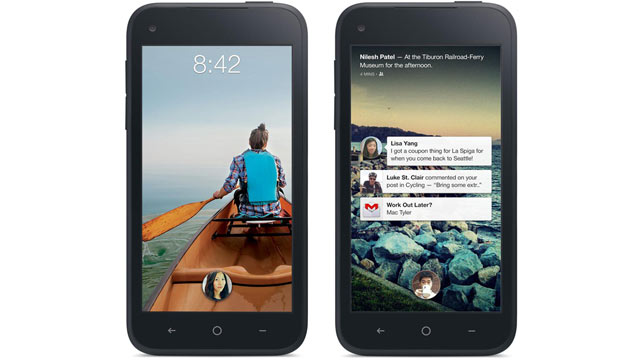
Facebook Home On Your Android Smartphone


          Facebook Home, a new app announced by Facebook that replaces your standard Android’s homescreen with an immersive Facebook experience featuring full-screen photos, status updates, and notifications is on the way, and you don't need an HTC First phone to get it. So how to get Facebook Home on your Samsung Galaxy S3,Note 2 and other android smartphones? Read on to take a look at.

 Facebook Home


         You can get Facebook Home preinstalled on the HTC First phone exclusively from AT&T, which is going on sale April 12. Facebook Home will launches on April 12th in the US, and will be available to users of Android Jelly Bean and Ice Cream Sandwich, but not Gingerbread. The international rollout will come later. Facebook Home initially available for Samsung Galaxy S3, Note 2, Galaxy S4, HTC One, One X, and One X+

If you have an existing Android phone, here's how to get it.

Note: Facebook Home will launch on April 12, so you can get it until then.

Own the right phone. Facebook Home is initially coming to the Samsung Galaxy S III , Galaxy S4, Galaxy Note 2, HTC One X+ and HTC One. It will almost certainly come to other Samsung and HTC phones running Android 4.1 or higher in the future, and possibly to other manufacturers as well. It probably won't come to low-end phones.

Make sure your Facebook account is attached to your phone, to integrate contacts and calendars. To do so, go into Settings, then Accounts and Sync, then add an account. Choose Facebook as the option and enter your details. This will give your phone some Facebook integration even without Home.

Install the standard Facebook app, from Google Play.

Wait until April 12. Facebook Home won't be available until then.

Go to Google Play on your phone and search for "Facebook Home.", Download the app.

Launch the app. That should launch you into Facebook Home. You'll need to enter your Facebook details.

Tap your Home button. You'll get a box that says "Complete action using." Tap Facebook Home, and Always.

There you go - now you have Facebook Home on your device. If you want to remove it, just go 
to Settings, Apps, choose Facebook Home and click Uninstall. It's that easy.